

Base-building is a huge part of Arknights: Endfield, and if you want to keep up with the game’s ever-growing demands, you’ll need more than just a functional setup; you’ll need an efficient one.
While the Automated Industrial Center allows you to create your own production lines from scratch, not every layout is worth the time and effort. That’s where blueprint codes come in. By using pre-made layouts shared by other players, you can instantly access optimized factory setups designed to maximize output, save space, and eliminate bottlenecks.
With that in mind, we’ve gathered some of the best blueprint layouts and codes currently available, so you can streamline your production and focus on what really matters in Arknights: Endfield.
Best Blueprint Layouts and Codes in Arknights: Endfield (NA/EU Servers)
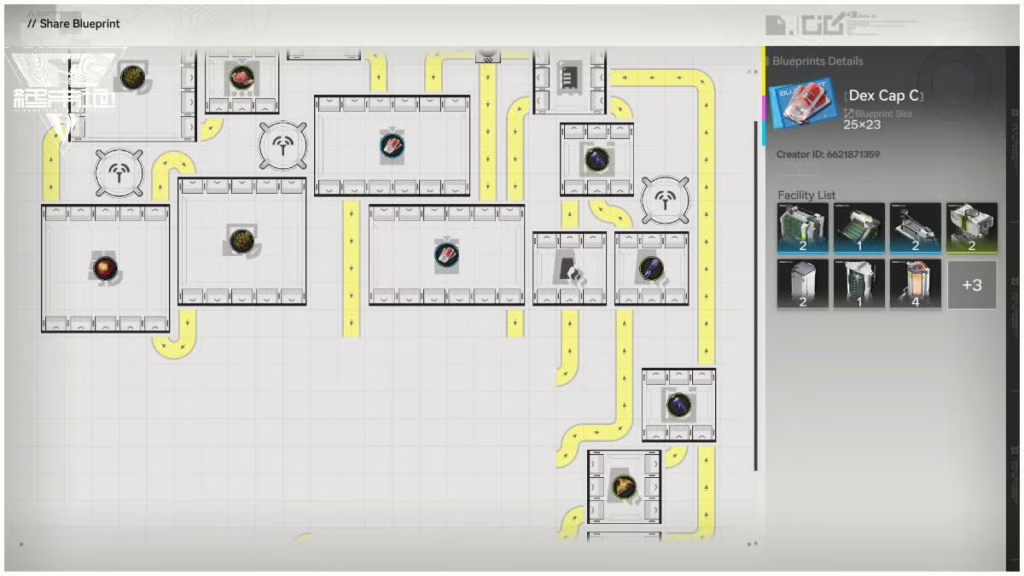
“Codes” are the bread and butter of the communal factory building in Arknights: Endfield. By using them, you’ll have access to factory layouts created by other players or by HyperGryph itself. These are all entirely optimized lines for specific products and they save you a lot of time, since the alternative would be installing every building one by one.
And as such, there are codes that stand out from the rest. The following list is optimized for the North America and Europe servers. Note that blueprint codes are region-locked and will not work across different server clusters, so make sure your account is set accordingly.
Early Game (Valley IV Foundations)
Focus on basic power, healing items, and exploration tools.
- Infinite Seed-Planter Loop: EFO0172UA40A7I55O0Ai — This self-sufficient loop is capable of farming up to two different types of plants simultaneously. Simply place 5-10 plants in the middle unit to start an infinite automated cycle.
- LC Valley Battery (Green): EFO01u1Ioa2oue0a6AoOU — This basic setup uses a Thermal Bank to provide essential initial grid power for your base. You can eventually sell these batteries for Stock Bills or use them to power mining rigs in the overworld. (Essential for initial grid power).
- Industrial Explosives (Bombs): EFO01893u6Ou8A122UI73 — his temporary setup is designed to produce the bombs needed for clearing obstacles and progressing through the overworld. Once you have a sufficient stock of 500-1000 bombs in your Depot, you can stash this setup to save space.
- Buck Capsule (C): EFO01o083aOa8261IieO — This blueprint is primarily used for obtaining early Stock Bills from the Refugee Camp. While not fully optimized, it is a helpful starter line for both healing Operators and trading resources.
- Amethyst Parts: EFO01eE7U9IO9u4AoAi8 — Maintaining this passively is important as you will need Amethyst Parts for creating Ziplines and Batteries. It is a straightforward build that remains easily scalable as your production needs grow
Mid Game (Resource Scaling)
Transition to Ferrium-based materials and improved energy storage.
- SC Valley Battery (Blue): EFO0136uI1EI3iauI0579 — This blueprint provides a more powerful energy source for players expanding their factory and mining operations. It is designed for high efficiency and can be adjusted to prioritize either power generation or trading.
- Buck Capsule (B): EFO01Iao8048I79725o08 — This efficient upgrade becomes available upon mining Ferrium Ore and utilizes five Depot Unloaders to maximize output. It is a direct improvement over the “C” line for generating Stock Bills and providing better healing.
- Ferrium Component (Blue Gear): EFO0172UA40A7I558O0Ai — This setup is used to passively produce the components required for mid-game gear. While temporary, crafting these is often required to complete specific Operation Manual missions.
- Industrial Explosive Farm: EFO01893u665531IUI73 — Unlike the temporary setup, an Explosive Farm is a more optimized layout (often utilizing four production lines) meant to stay active or be easily swapped in whenever your exploration and delivery tasks demand a massive, consistent supply.
Late Game (Valley IV Endgame)
High-output layouts designed for maximum Stock Bill generation once you hit Regional Development Level 11.
- Ultimate Mega Base Combo (18 Buck Capsule A + 18 HC Valley Battery per min):
- Top Left: EFO01iOe7u5E0O2472U4 — This code represents the first quadrant of the synchronized layout, designed to fit precisely with adjacent modular sections.
- Bottom Left: EFO01Iao8U10Oa905o08 — This section handles essential logistics in the lower-left area of the AIC plot to prevent resource clogging.
- Mid Top: EFO01a7094eU37A7oe5e — A central component focusing on coordinating material flow across the upper-middle section of the base.
- Mid Bottom: EFO01893ui06291oUi73 — This layout ensures the lower-middle production lines remain stable enough to support the massive battery and capsule output.
- Top Right: EFO010U9657AuUiiE179 — Fills the upper-right quadrant of the Core AIC to maximize material processing speed.
- Bottom Right: EFO011ea02i78eU134O7 — The final quadrant for the main base, utilizing every available tile for high-tier Valley IV products.
- Sub-PAC Setup: EFO019A61OUiIAeI5uI2 — This versatile side-base layout should be used on all three outposts to provide the 4 Depot Busses necessary for the main factory’s demands.
- Cryston Component (Purple Gear): EFO01u1Ioa2oue0a0AoOU — This code is designed to interface effectively with both the Depot and the AIC by utilizing three output belts. To maintain steady production and prevent machinery from idling or clogging, the layout requires a balanced input of two Packed Origocrusts and two Cryston Fibers. While these components are vital for providing additional stats and protection as the game’s difficulty ramps up, the setup is often considered temporary or skippable. Many players choose to use this blueprint only until their squad is sufficiently equipped, eventually bypassing it to rush toward the endgame and the acquisition of Gold Rarity gear.
Wuling Region (Version 1.1 Content)
Advanced layouts incorporating fluid mechanics and new ores like Cuprium and Xiranite.
- Xiranite Production (2-Forge Setup): EFO01u1I699e210OAoOU — Xiranite is the most critical resource in Wuling, required for regional batteries and high-rarity Gold gear. This layout focuses on maximizing the Forge of the Sky, which is the only facility capable of producing this material.
- SC Wuling Battery Hub: EFO01O3E2uU9O9I3I9oe4 — This code acts as the foundational first section of a multi-part factory layout that automates the production of approximately 12 SC Wuling Batteries and nearly six Yazhen Syringes [A] per minute. Because it is optimized for Version 1.1 content, it is intended for advanced players who have reached at least Regional Development Level 8, fully expanded their factory area, and unlocked technologies for Cuprium Ore mining. To reach its full potential, the hub must be integrated with subsequent blueprint parts and requires the manual addition of pumps and pipe inlets to manage the complex fluid mechanics necessary for sustained material output.
- Cuprium Component Hub: EFO014o5Iuu0Ao3uE71A — This integrated hub focuses on producing all the new materials introduced in version 1.1, such as Refined Cuprium. It is a mid-game necessity that effectively manages the region’s complex fluid-based mechanics.
- Yazhen Syringe [A]: EFO0158OE72A96u61eIoe — These high-yield medical items are essential for endgame survival and generating Wuling Stock Bills. This specific setup is highly balanced and can produce approximately six syringes per minute.
How to Import Blueprints in Arknights: Endfield
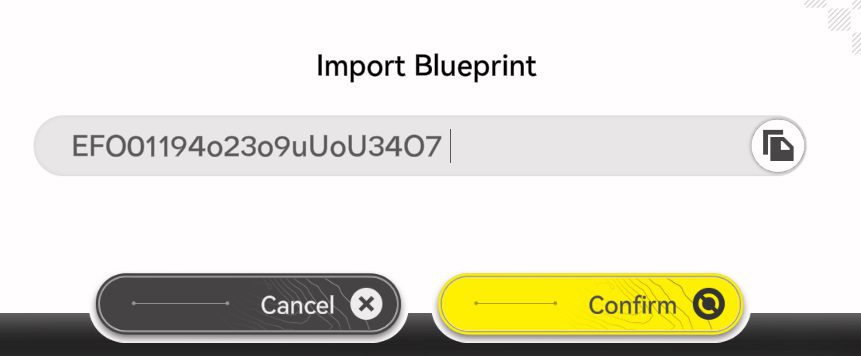
Using community blueprints can save hours of manual labor, but you still need to know how to properly implement them through the Automated Industrial Center (AIC). The game doesn’t make this feature obvious, though. In fact, many Arknights: Endfield players stumble upon it by accident, if they find it at all. To make sure you’re not one of them, here’s what you need to do.
- Teleport to a core AIC area or any Outpost.
- Enter AIC Mode and switch to Top View (usually Q on PC or R3 on controller).
- Press F1 to open the Blueprint menu.
- Navigate to the Shared Blueprints tab and select Import.
- Paste the alphanumeric code and confirm to save the layout to your list.
Naturally, given how the codes are stringed, it goes without saying that you should write them down first—or, you know, have this guide with you.
Final Thoughts

Mastering blueprints is essential for anyone looking to survive and progress effectively in Arknights: Endfield. As the backbone of AIC factory management, these designs let you skip the frustration of manual logistics and trial and error, and instead focus on combat and exploration.
With optimized layouts, you can maintain a stable supply of materials, manage bottlenecks like Ferrium, and reach key milestones faster, especially those that reward valuable Oroberyl.
Beyond efficiency, the blueprint system creates a strong collaborative aspect within the community. Sharing and improving these alphanumeric codes turns one player’s solution into a tool for everyone. Even beginners can build clean, modular bases that scale over time. In the end, blueprints are not just shortcuts but a core system that rewards planning, creativity, and long-term thinking.
Arknights: Endfield is available as a free-to-play game, although microtransactions apply here and there, on PlayStation 5, Windows via the official site or Epic Games Store, as well as Apple and Android devices.